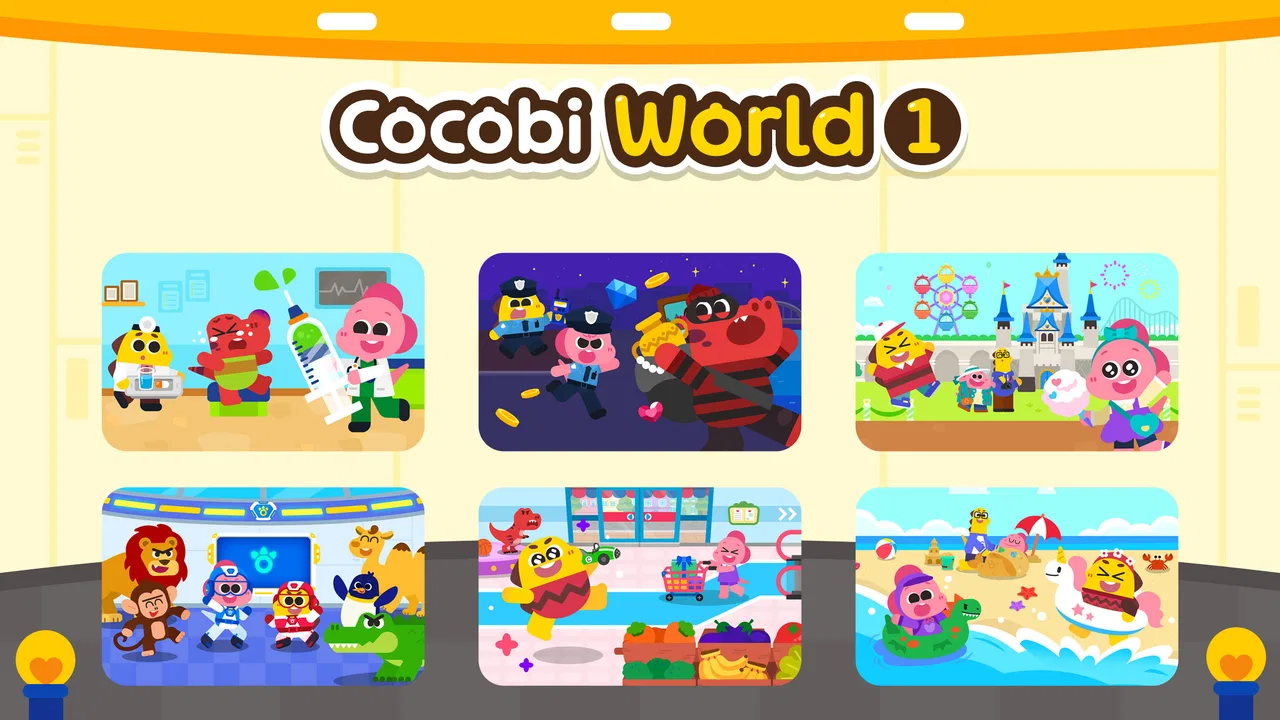
Cocobi World 1 - Kids Game
- 4.2
- Rating
- 10.00M
- Installs
- Free
- Price

 Analysis by App-foxy
I found Cocobi World 1 - Kids Game most enjoyable as a gentle first game for young children rather than as a demanding educational course. It puts Cocobi’s dinosaur characters at the center of short, simple activities, so a child can explore without needing to understand complicated menus or rules. My overall view is positive: it is approachable, cheerful, and easy to introduce during a quiet moment, but parents should see it as light learning through play, not a complete substitute for guided practice.
The game is free to start, is suitable for Everyone, and comes from KIGLE, a developer focused on child-friendly experiences. Its average rating is 3.9 from around 3,700 ratings, while its reach has grown beyond 5 million installs. Those figures suggest that many families have tried it, although the rating also tells me not to present it as flawless. The current version is 1.0.15, and it runs on Android 7.0 or later.
How the Cocobi experience works for young players
I’d begin by watching how a child approaches the game rather than assuming the dinosaur theme will suit everyone: a short, shared first session can show whether the activities feel inviting or confusing. That gives me a practical way to judge the fit before making it part of a routine, and it leads naturally to what the Cocobi setting does especially well.
You May Also Like

 Blood Strike: 2.5 Anniversary
Blood Strike’s Loadouts Turn Every Drop Into a Tactical Gamble
A close look at Blood Strike’s custom loadouts: how fast access to signature weapons reshapes its battle royale rhythm, rewards preparation, and narrows the gap between fights.

 Pandora - Music & Podcasts
Pandora’s Music Is Easy to Start, but Harder to Recover
Pandora’s strength is its low-effort path from a seed to a station. Its weak spot is how much confidence it asks you to place in connection, setup, and quiet recovery.

 8 Ball Pool
 Is Built on Rivalries, Rematches, and Routine
A close look at the rivalries, rematches, shared routines, and unanswered safety questions that turn a quick pool match into a persistent mobile community.

 Samsung Music
’s Quiet Strength Is Playing What You Already Own
Its reach comes less from spectacle than from dependable access to a personal library. That simplicity is both the app’s strongest retention engine and its ceiling.

 AccuWeather: Weather Radar
AccuWeather Review: A Quick, Clear Forecast for Everyday Decisions
For everyday plans, the best forecast is the one you can understand quickly. AccuWeather makes rain timing, radar, and local conditions easy to act on, with a few trade-offs.

 Hill Climb Racing
Why Hill Climb Racing Still Turns Crashes Into One More Run
A tiny car, a bumpy hill and one more upgrade: Hill Climb Racing keeps resurfacing because its simple chaos makes every near-miss feel personal.
More From Our News Desk



A welcoming first step into educational games
The biggest strength is the low barrier to entry. A preschool child does not need to read long instructions or understand a complex progression system before getting started. The Cocobi setting gives the experience a friendly identity, and the dinosaur theme helps the activities feel like play instead of a lesson delivered by an adult.
That distinction matters in everyday use. If I were handing the phone to a child while preparing dinner, I would want something that could be understood through its visual presentation and simple interactions. This game fits that moment better than an app that expects a child to follow several written steps or remember a large set of rules.
I also like the way the game can support short sessions. Young children often lose interest quickly, so a compact activity can be more useful than a large world that takes too long to understand. I would treat it as a ten-minute option between other parts of the day, not as something a child should play continuously for a long stretch.
Why the dinosaur theme helps
Cocobi is not just a label placed on a generic worksheet. The cute dinosaur presentation gives children a reason to return to the activities. For a young player, familiar characters can make an unfamiliar task feel safer, especially when the child is still learning how to tap, choose, and respond on a mobile screen.
In my experience, themed educational games work best when the theme supports the interaction without overwhelming it. Here, the dinosaurs provide the emotional hook, while the activities remain the main event. That makes the game easier to recommend to a child who is interested in animals or colorful characters but is not yet ready for a more academic learning app.
Parents can also use the theme as a starting point for conversation. After a session, asking what the dinosaurs did or which activity was most fun can turn passive screen time into a small shared learning moment. The game does not need to carry the entire educational value by itself; it can open the door to talking, counting, identifying, and explaining away from the screen.
Where it sits among children’s learning games
Compared with a traditional puzzle app, Cocobi World 1 feels more character-led and less like a collection of isolated exercises. Compared with a structured early-learning platform, it is lighter and less formal. That is both its appeal and its limitation.
If your priority is a relaxed introduction to mobile play, this is a better fit than an app that feels like digital homework. If you need a carefully sequenced program for letters, numbers, reading, or school preparation, I would look for a dedicated learning platform instead. This game can complement those tools, but I would not use it as the only educational app on a child’s device.
The free entry point also makes it easier to test the experience before committing. However, in-app purchases cost $3.49 per item, so I would check the purchase controls before allowing independent play. A child may understand how to complete an activity without understanding what a purchase means. That is not a problem unique to this game, but it is an important practical detail for families.
A realistic family routine
Imagine a child coming home from preschool and needing a calm transition before dinner. I would open the game together for the first few sessions, let the child choose an activity, and then ask them to explain what they are doing. Once the controls are familiar, the child could handle a short session more independently while an adult remains nearby.
This routine works because the game is easy to enter and easy to leave. There is no need to turn it into a major event. The parent can stop after one activity, move to a snack, and return another day without making the child feel that progress has been lost. That flexibility is valuable for younger children, whose attention and mood can change quickly.
A useful tip is to avoid presenting it as a reward for every completed task. If the game becomes the automatic prize, the child may focus only on reaching screen time. I prefer using it as one option among drawing, books, outdoor play, and conversation. That keeps its playful educational role clear and prevents it from becoming the default activity for every quiet moment.
What parents should watch during play
I would not leave a young child to explore every part of a free game without an initial check. Sit beside the child at the beginning, observe how the menus work, and see whether the available activities match the child’s ability. This is especially useful when a child is still learning the difference between tapping an object and selecting a button that changes the game.
It is also worth watching for frustration. A child who cannot complete an interaction may not be able to explain what went wrong. If the child repeatedly taps without understanding the response, I would step in, demonstrate once, and then let the child try again. If the activity still feels confusing, switching to another part of the game is better than turning play into a struggle.
For children who are sensitive to busy visuals or sound, the best approach is personal observation. Every child reacts differently to animated characters and game feedback. I would keep the first session short and judge the child’s behavior afterward: did they talk about what they learned, or did they seem overstimulated and irritable? That answer is more useful than assuming every child will respond to the presentation in the same way.
The meaningful weakness: light learning can feel limited
The same simplicity that makes the game accessible can make it feel shallow for children who already have strong familiarity with educational apps. A child who wants increasingly difficult challenges may move through the experience quickly or ask for something with clearer progression. I would not choose this as the main game for an older child who needs sustained problem-solving.
There is also a difference between recognizing an answer inside a game and understanding the idea in real life. A child may successfully complete an activity without being able to explain the reasoning behind it. That is why I see adult interaction as a major part of the value. Asking “How did you know?” or “Can you find another example in the room?” helps transfer the activity beyond the screen.
Another trade-off is the presence of optional purchases. The game is free, which is convenient for trying it, but families should make their own rules about purchases before handing over the device. I would use the game’s free content first, decide whether the child is genuinely benefiting, and only then consider whether an additional item is worthwhile.
The rating of 3.9 also supports a measured recommendation. It is not a warning to avoid the game, but it does suggest that the experience will not satisfy every child or parent. Some families will value the simple dinosaur presentation, while others may want more depth, more advanced learning goals, or a more tightly organized curriculum.
Who will get the most from it
I think this game is best for preschool and early elementary children who enjoy cute animal characters and need an uncomplicated introduction to educational play. It is particularly suitable for a child who becomes discouraged by difficult games, since the friendly presentation makes the first contact less intimidating.
It can also suit families looking for a free starting point. Parents can see how the child responds before spending money, and the Everyone rating makes it a reasonable candidate for a shared family device. I would still supervise the first sessions, not because the game is inherently unsuitable, but because young children benefit from help understanding both controls and purchase boundaries.
Children who are learning English may also enjoy the familiar visual context, but I would not assume that playing alone will provide a full language-learning program. If language development is the main goal, I would pair the game with reading aloud and direct conversation. The characters can encourage attention, but a parent or teacher is still better at correcting misunderstandings and adapting the pace.
Who should choose something else
I would skip this game if you are searching for a complete school-readiness curriculum with measurable stages and a clear academic sequence. A dedicated literacy or mathematics app will be more appropriate for that purpose. I would also look elsewhere for an older child who wants strategy, open-ended construction, competitive play, or increasingly complex puzzles.
It may not be the right choice for a family that wants an entirely purchase-free experience. Although the game is free to download, the available in-app purchase price of $3.49 per item means adults should pay attention to how the device is shared. If your household already has a reliable learning app that your child loves and that offers deeper activities, adding this one may not provide enough extra value.
Practical ways to make the game more useful
My first recommendation is to play beside the child once before allowing more independent use. This reveals which interactions are intuitive and which need explanation. It also gives you a chance to notice whether the child is engaging with the activity or simply tapping rapidly to produce reactions.
My second recommendation is to connect each session to an offline activity. If the game involves recognizing something, look for similar examples around the home. If it encourages choosing or sorting, use toys, clothes, or kitchen objects for a real-world follow-up. This small step turns a short game session into a broader learning exercise without requiring extra equipment.
My third recommendation is to use the game as a conversation prompt rather than a babysitting replacement. Ask the child to describe the dinosaurs, explain a choice, or show you how an activity works. Those questions reveal whether the child understands the task and give the parent a clearer sense of what the game is actually contributing.
Finally, keep expectations modest. The strongest benefit is likely to come from repeated, comfortable exposure to simple interactions, not from rushing through every available activity. Short sessions with a little discussion are more valuable than leaving the game running while the child plays without attention.
My final recommendation
KIGLE has made a friendly educational game that succeeds because it does not demand too much from a young player at the beginning. The Cocobi dinosaurs make the experience approachable, and the free starting point lowers the risk for parents who want to try it. Its broad audience and more than 5 million installs show that it has reached many families, while the less-than-perfect rating is a useful reminder to match it with the right child.
I would recommend it to parents who want a simple, character-based game for short supervised sessions. I would not recommend relying on it alone for academic progress, and I would be cautious about purchases and screen-time habits. For a child who needs a friendly first step into educational games, it is a worthwhile option. For a child seeking depth, challenge, or a structured curriculum, a more specialized alternative will be the better choice.
My verdict is that Cocobi World 1 works best as a small part of a child’s routine: a playful doorway into choosing, observing, and responding, followed by real conversation and hands-on activity. Used that way, it feels useful rather than overpromising. Its real strength is accessibility, not advanced educational depth.
FAQs for Cocobi World 1 - Kids Game
01What age group is Cocobi World 1 - Kids Game suitable for?
Cocobi World 1 - Kids Game is designed specifically for children aged 3 to 8 years. Its content and interactive elements are crafted to support early childhood learning and development, making it ideal for preschoolers and young kids. Parents can feel confident knowing the app is both fun and educational.
02Does Cocobi World 1 - Kids Game contain any in-app purchases or ads?
Cocobi World 1 - Kids Game offers a free version with some optional in-app purchases to unlock additional content and features. The app also contains ads, but they are child-friendly and can be removed by purchasing the ad-free version. This ensures a safer and more focused experience for children.
03How does Cocobi World 1 - Kids Game enhance learning for young children?
The app combines interactive gameplay with educational content, focusing on areas like math, language, and problem-solving skills. Through engaging activities and colorful graphics, Cocobi World 1 encourages cognitive development while keeping children entertained. It's designed to make learning a natural and enjoyable part of playtime.
04Is Cocobi World 1 - Kids Game available offline?
Yes, Cocobi World 1 - Kids Game can be played offline after the initial download. This allows children to enjoy the game without requiring a constant internet connection, making it perfect for travel or places where Wi-Fi is unavailable. However, some features may require online access for updates or additional content.
05Can parents monitor their child's progress in Cocobi World 1 - Kids Game?
The app provides a parent dashboard where adults can monitor their child's progress and activity. This feature helps parents understand which skills their child is developing and offers insights into areas where they might need more support. It’s a valuable tool for ensuring a balanced learning experience.
Pros
- Engaging educational content for kids.
- User-friendly interface for young users.
- Vibrant graphics and animations.
- Safe environment with no ads.
- Wide variety of mini-games included.
Cons
- Limited content without in-app purchases.
- Requires internet for some features.
- Occasional bugs in gameplay.
- Lacks parental control settings.
- Some games may be too easy for older kids.

Cocobi World 1 - Kids Game
Gallery